Cross-posted. This article’s canonical home is Data Lakehouse Hub.
The Semantic Layer as a Translation Engine: Bridging Natural Language and SQL
“What was our revenue last quarter?” is a five-word question. The SQL that correctly answers it might be 40 lines long : joining three tables, applying a canonical metric definition, filtering by the right date boundaries, excluding specific transaction types, and handling currency normalization for international transactions.
An AI agent bridging from that natural language question to that SQL has a translation problem. It needs to know what “revenue” means in your specific business context, what counts as “last quarter,” which tables contain the relevant data, and how those tables relate to each other.
The semantic layer is what carries that business knowledge from your data team to the AI agent. Without it, the agent guesses. With it, the agent translates.
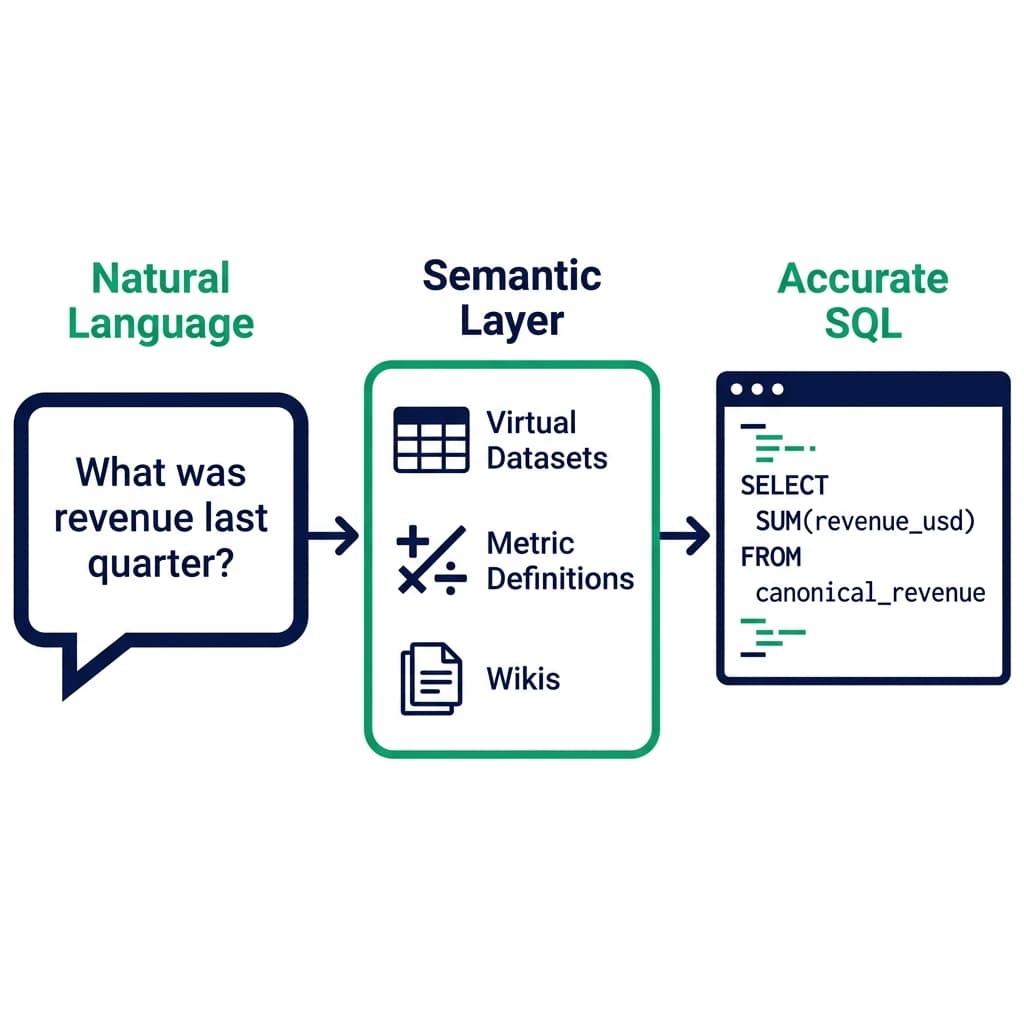
The Translation Stack
The path from a business question to a SQL result passes through several translation steps:
- Intent recognition: The LLM interprets the question and identifies the analytical intent (revenue by dimension, over a time period)
- Entity resolution: Business terms like “revenue,” “last quarter,” and “region” are mapped to specific SQL constructs
- Schema mapping: The resolved entities are mapped to actual tables and columns in the data catalog
- Query generation: The agent writes SQL based on the resolved schema mapping
- Validation: The query is validated against the schema and (optionally) executed in a test mode before full execution
The semantic layer is the component that makes steps 2 and 3 reliable. It defines the mapping from business terms to SQL constructs, and it provides the schema documentation that the agent uses to select the right tables and columns.
Without a semantic layer, the agent attempts steps 2 and 3 using only its general knowledge and the raw schema. General knowledge is unreliable for company-specific business logic. Raw schemas provide column names but not business meaning.
Virtual Datasets: Encoding Business Logic as SQL
The central artifact of the semantic layer is the virtual dataset (VDS) : a SQL view that encodes business logic as a reusable, named query.
A revenue VDS might look like this:
-- Virtual Dataset: canonical_revenue
SELECT
  o.order_id,
  o.customer_id,
  c.region,
  c.segment,
  p.category AS product_category,
  p.subcategory AS product_subcategory,
  o.order_date,
  o.amount_usd * fx.usd_rate AS revenue_usd  -- Currency normalized
FROM orders o
  JOIN customers c ON o.customer_id = c.customer_id
  JOIN products p ON o.product_id = p.product_id
  JOIN fx_rates fx ON
    o.currency = fx.currency
    AND DATE_TRUNC('day', o.order_date) = fx.rate_date
WHERE o.status = 'completed'  -- Exclude cancelled and refunded
  AND o.test_order = false    -- Exclude internal test transactions
This VDS encodes four business rules: use the completed status, exclude test orders, normalize currency to USD, and join the canonical customer and product dimensions. When the AI agent queries canonical_revenue, it automatically applies all four rules correctly, even if it doesn’t know those rules exist.
The agent writes a simple query:
SELECT region, SUM(revenue_usd)
FROM canonical_revenue
WHERE order_date BETWEEN '2026-01-01' AND '2026-03-31'
GROUP BY region
The underlying join complexity and business rule enforcement happen inside the VDS definition. The agent’s query is simple and correct.
Metric Definitions in the Semantic Layer
Beyond individual columns, the semantic layer should define composite metrics as named objects.
For a tool like Dremio’s semantic layer, metric definitions are SQL expressions annotated with documentation:
-- Metric: monthly_active_users
-- Definition: Users with at least one completed order in the calendar month
SELECT
  DATE_TRUNC('month', o.order_date) AS month,
  COUNT(DISTINCT o.customer_id) AS monthly_active_users
FROM canonical_orders o
GROUP BY 1
When the agent needs to answer “how many active users did we have last month,” it finds the monthly_active_users metric definition in the catalog, uses it as the authoritative source, and generates a query against that metric rather than reinventing the definition from scratch.
Metric consistency is the most practically important benefit of semantic layer documentation. Inconsistent metric definitions : different teams calculating “active user” differently , are the most common cause of business stakeholders losing confidence in a data platform. The semantic layer resolves this by making one definition authoritative.
Wikis and Labels: Context for the Agent
Not all business context can be encoded in SQL. The semantic layer also needs natural language documentation that the agent can query directly.
Table wikis describe the table’s purpose, the business process it represents, the update frequency, the authoritative source system, and any known data quality issues:
“The
canonical_revenuevirtual dataset represents completed transaction revenue, normalized to USD. It is updated nightly at 02:00 UTC from the order management system. Revenue is defined as the amount_usd of all orders with status=‘completed’ and test_order=false. Currency conversion uses end-of-day FX rates from the fx_rates table. This VDS does not include refunds; seenet_revenuefor refund-adjusted figures.”
Column labels classify columns by type: PII: Email, Financial: Revenue, Operational: Timestamp, Key: Customer. The agent uses these labels to understand the purpose of a column without reading its values.
Relationship annotations describe how datasets connect: “canonical_orders joins to customers on customer_id. The relationship is many-to-one. Not all customers have orders : left join required for customer-level reporting that includes customers with zero orders.”
When the agent is uncertain, it queries these annotations directly. Dremio’s MCP server exposes them as searchable metadata, so the agent can ask “what does the revenue_usd column in canonical_revenue represent?” and get the documented answer.
Natural Language Translation Accuracy Tests
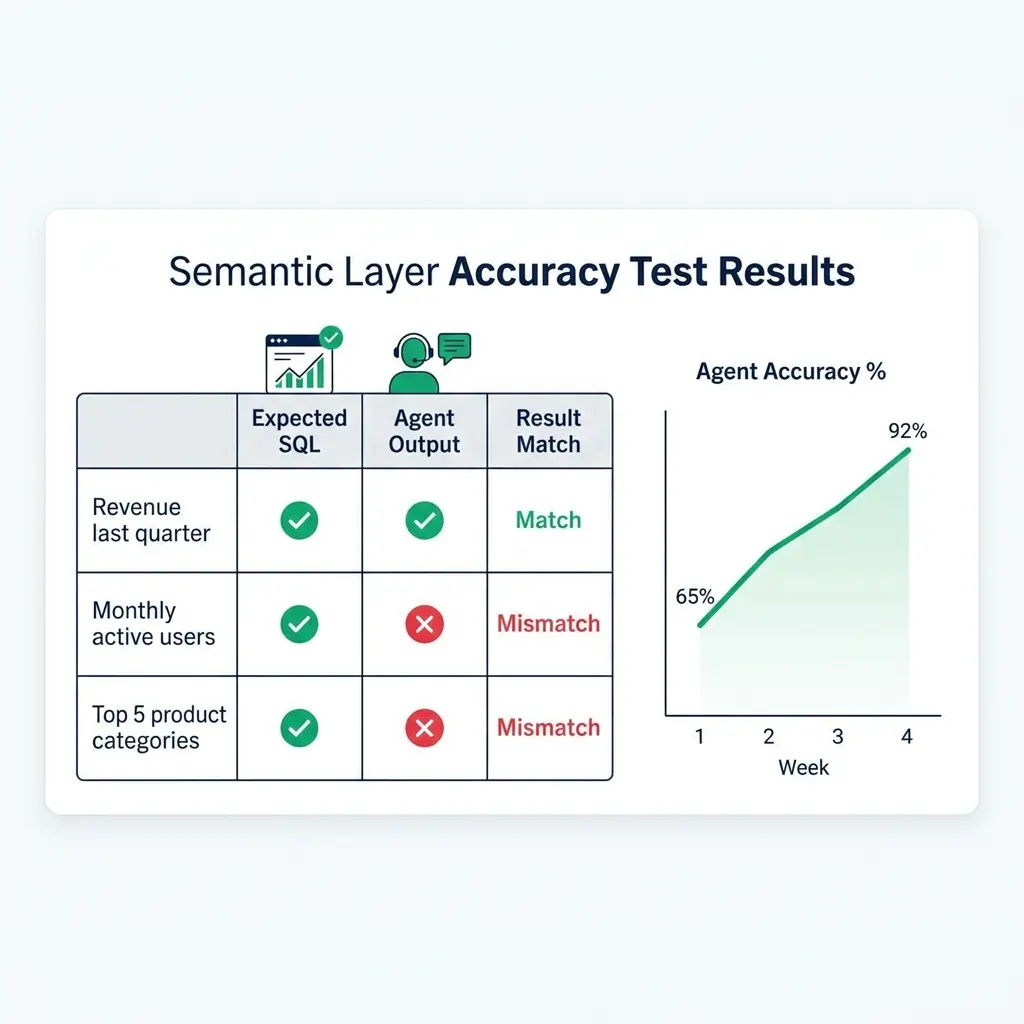
Build a test suite for your semantic layer’s translation accuracy. The test suite contains reference questions with known correct SQL answers:
| Natural language question | Expected SQL pattern | Correct result range |
|---|---|---|
| “Revenue last quarter” | SUM(revenue_usd) from canonical_revenue with Q1 2026 filter | $45M-$60M |
| “Monthly active users this year” | COUNT(DISTINCT customer_id) monthly from canonical_orders | 15K-25K/month |
| “Top 5 product categories by revenue” | Revenue by product_category with LIMIT 5 | Specific category names |
Run the agent against each test question weekly. Track accuracy over time. When accuracy drops on a specific question type, it usually indicates a documentation gap : add more context to the relevant VDS or column wiki.
Where the Semantic Layer Lives in Dremio
Dremio’s semantic layer is part of the platform’s Open Catalog, not a separate product. Every virtual dataset is a SQL view that can be queried directly, shared with BI tools, and documented with wikis. The same VDS that the AI agent uses is the same one that Tableau, Power BI, or Looker queries , ensuring that dashboards and AI answers are based on identical business logic.
The semantic layer documentation covers how to build a three-tier (bronze/silver/gold) semantic layer in Dremio. The gold tier is the agent’s primary entry point for business questions. The silver tier supports more complex multi-step analyses. The bronze tier is restricted to pipeline agents and data engineers.
Try Dremio Cloud free for 30 days and build your first semantic layer on top of your existing data sources.